
|


|
Download Your Pink Cherry Blossom Metronome
Show Contents- see also Extra Downloads
|

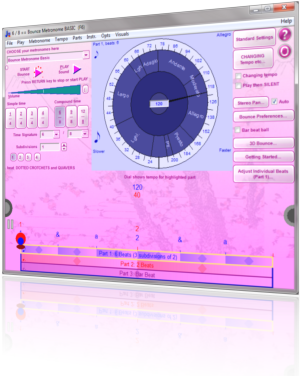
Recommend Bounce Metronome Pro to your FriendsWhile you wait for it to download: Or click on facebook Like or Tweet button at the top of any page - to share the page with your friends. For other social networks (Delicious, Stumbleupon etc) use the Share / Save icon at the bottom of any page of this web site Save time, and buy the metronomes right away
|
To download it, CLICK HERE:
For Windows XP, 2K. Vista or Windows 7 You use the same download to install the program for the first time, or to update to the latest version. To update just install on top of the existing version. Please be patient, and wait for it to download completely before you run the installer. If you need a bit more help to download and install it, skip to download instructions After you install it, look for in the drop menu. Alternatives (in case of incomplete download): Mirror 1 - Mirror 2 - Mirror 3 You can find some extras including more skins on the Extra Downloads page While you wait for the download, why not buy the software? Save time, and buy the metronomes right away
Your Privacy and Security is respected - SHOW DETAILS After the installThe download includes all the Bounce Metronomes. When Bounce Metronome Pro starts up, select from the droplist of metronomes in the main window - e.g. the Polyrhythm, Swing, Drum & Dance, Basic or Pro metronome or whatever, depending on your interests. For the cherry blossom skin, look for in the drop menu. When you first run the metronome, you may need to adjust the synchronisation of visuals with the ticks which you do in the window. For detailed instructions, and information about the download skip to download instructions |
Description
skip - skip back
Bounce Metronome beats time precisely, with drumstick, baton or bouncing balls - to help you keep in time and continually improve your sense of tempo and rhythm. As Reviewed in Sound On Sound Magazine, January 2010
It's easy to use. Practice any time signature and with subdivisions. With its many pro features - you can practice any rhythm you are likely to encounter - including rhythms with swing, polyrhythms, mixed meters, syncopated rhythms, drum rhythms such as paradiddles etc.
Also has special tempo options as well (tap at tempo, gradually changing tempo etc) and many other features.
Do you want to find out more about this metronome and its capabilities? You can start with: What is special about this Metronome Software. To find out what's new with this upload see What's New.
Download Instructions
skip - skip back
To download it, CLICK HERE:
 Setup Bounce Metronome Pro [7 MB]
Then wait for it to download.
Please be patient, as depending on your connection speed, it may take a little while to download the installer.
After the download just run the installer to install the program - it works like any other installer, just click through the screens until it is finished.
If you get an error message about an incomplete download when you run the installer, try downloading again with these alternative mirrors: Mirror 1 - Mirror 2 - Mirror 3
If you need detailed help see the STEP THROUGH.
You can delete the installer once you are done - it is only needed to install the program. You can come back here at any time if you need to redownload it (also earlier uploads are kept on the What's new page).
After the install, when Bounce Metronome Pro starts up, select from the droplist of metronomes in the main window - e.g. the Polyrhythm, Swing, Drum & Dance, Basic or Pro metronome or whatever, depending on your interests.
For the cherry blossom skin, look for in the drop menu.
When you first run the metronome, you may need to adjust the synchronisation of visuals with the ticks which you do in the window.
You can use the download on this page to install the program for the first time, or to update to the latest version. (updaters - see How to update).
Extras
You can extra skins from the Extra Downloads page. You can also get extra video and audio plug-ins from the Extra Downloads page.
How to find your metronome after the download
After the install, choose the metronome of interest from the drop list in the main window, e.g. Swing Metronome, Polyrhythm Metronome etc.
N.B. If you need to adjust synchronisation of the bounces with the audio - do that in the Bounce Preferences window
You can buy an unlock key at any time to unlock the software permanently.
 - Buy now - for only $6.99 - or $26.99 for the Pro version with all the Bounce Metronomes (UK £4.99 and £26.99). You have a Money Back Guarantee
About the Download
skip - skip back
How long it takes to download - On most broadband connections it may take a minute or so to download depending on your connection speed. With a fast broadband it will only take a few seconds. It may take several minutes if you have a slow connection, and it will take about 14 minutes to download if you are on 56K dial up.
All the downloads on this site are free of viruses and other malware - for an independent report see the download Analysis.
STEP THROUGH
how to install - once download is complete - the install
How to install
skip - skip back
First click on the button or link to download the program:
| |
Setup Bounce Metronome Pro [7 MB] Includes your free 30 day Test drive with all the features unlocked. |
Or if you prefer to download it first and run as a separate step, then right click on the button or link, and choose Save Link As - many people do that, and a common place to save it is on the desktop. It doesn't matter how you do it or where you save it.
The right click method to do it in two steps means you can run it later, and don't need to do it immediately after it downloads. So it is often the best way to do it if you have a particularly slow connection. You can just leave it downloading on your computer, and then come back later when the download is finished to run the installer.
Either way, be sure to wait until your web browser tells you that the download was successful before you run the installer. Please be patient, as this may take up to a minute, or several minutes if you have a particularly slow connection speed.
Step through - Once the download is complete
skip- skip back
Once the download is complete, the browser may offer to run it automatically. If not, look in the save folder for , and run it (usually with a double click). users can find it in its menu, under .
You may then be asked to give your permission for the program to run.
On It requires administrative privileges to make shortcuts in the All Programs menu, also on the desktop (if you ask for that), so you may be asked to give it permission to install.
You may be warned that the publisher of the software couldn't be verified. Unfortunately, I am unable to support this verification initiative in its present form. Not many software publishers do.
Just say Yes it is okay to go ahead.
All the programs on this site are adware, malware and virus free. For an independent report, see the McAffee site advisor web safety ratings for bouncemetronome.com - and their Download Analysis.
Step through - The install
skip- skip back
After you download, wait for the program to run, and you should see something like this screen shot:
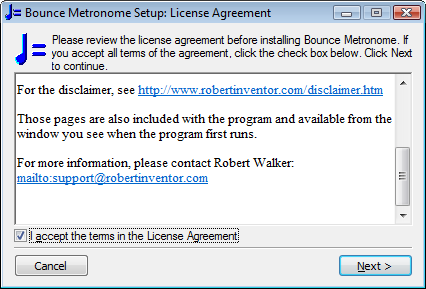
(this is just an image - so don't click here, click on the installer when it runs)
It rarely happens, but you could get an error message about an "invalid checksum" instead of this screen. If this happens to you, then it is nothing to worry about. Just download the file again using one of these alternative links: Mirror 1 - Mirror 2 - Mirror 3 and try again. The normal reason for this is that the installer file didn't download completely - if you check the file size you'll probably find that it is smaller than it should be.
Review and accept the license, choose Next.
You will see something like this:
- 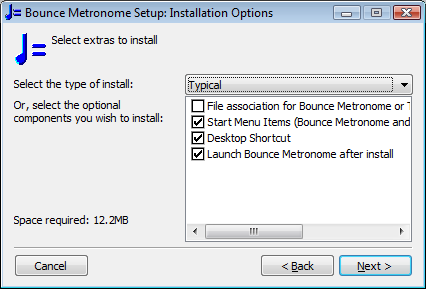
(screen shot image only)
Decide whether you want a desktop shortcut, and review the other selections in this window.
Press .
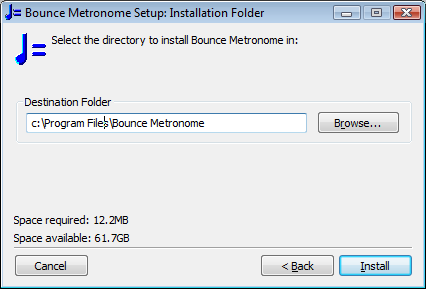
Glance at the install directory to see if that is where you want to install it - the preset location of will be suitable for most.
Under Vista, the preset location is - for the reasons see Preset install folder for Vista.
Click .
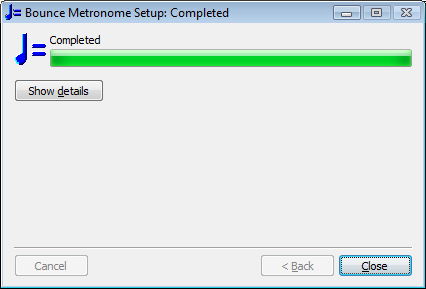
Finally click , and the installation is complete. will run straight away.
After Bounce Metronome Pro starts up, select from the droplist of metronomes in the main window - e.g. the Polyrhythm, Swing, Drum & Dance, Basic or Pro metronome or whatever, depending on your interests.
When you first run the metronome, you may need to adjust the synchronisation of visuals with the ticks which you do in the window.
To run it again in the future, look for the icon on your desktop, or go to .
You can delete the installer once you are done - it is only needed to install the program.
Note that if you ever wish to roll back to any particular previous version of Bounce Metronome Pro, all the installers for earlier dates are kept for reference on the What's new page - this is the equivalent of the download guarantee scheme provided by some software retailers - except that it is 100% free.
This installer is very system friendly. It doesn't change any system files or settings. All it does is to unpack Bounce Metronome and all its files into its folder, and add a shortcut to the program to your desktop (if wished) and the menu.
Adding Extra Skins, Video formats, Csound and Audio Formats
skip - skip back
These have been left out of the installer to help reduce its size.
Bounce Metronome Pro comes pre-installed with a few skins, but there are many more examples available. See the Extra Downloads page.
You can also download the Timidity plug in which lets you convert midi files to wav, and to add sound to exported animations of your rhythms.
Bounce Metronome Pro comes pre-installed with avi as its only video format for export or import. If you want to save in other video formats, or if you are interested in using video animations for animated textures such as animated animated seas and skies, you can get the MEncoder plug in from the Extra Downloads page.
The program also comes with support for recording to mp3 already installed, as well as uncompressed audio (.wav). This is enough for many users. Hwever, some may want to add support for the .Ogg file format which is preferred by some musicians as an alternative to mp3. You can also add support for legacy sound formats such as Sun Au.
Then the CSound plug-in add adds extra instrument sounds you can use with the program for saved audio clips, and also to play in real time too.
If you are interested in any of these, again visit the Extra Downloads page to add CSound or extra sound formats.

What the installer does
skip - skip back
This installer doesn't change any system files or settings. All it does is to
- Unpack Bounce Metronome and all its files into its folder
- Add a shortcut to your desktop (if wished) and the menu.
- Add the file association for Bounce Metronome rhythms and projects (to make it easy to open files made with the program).
If you install it in Vista you may notice that it installs into instead of - this is for techy reasons to do with the way the hidden virtual store works in Vista. You can change this to any location you please - but if you have UAC switched on, it's probably best not to install it into . For details, see Preset install folder for Vista.
You may be asked to give your permission for the program to run. On It requires administrative privileges to make the shortcuts. On XP or Vista, You may also be warned that the publisher of the software couldn't be verified. Unfortunately, I am unable to support this verification initiative in its present form. Not many software publishers do.
Just say Yes it is okay to go ahead.
All the programs on this site are adware, malware and virus free. For an independent report, see the McAffee site advisor web safety ratings for bouncemetronome.com - and their Download Analysis.
How to update to the latest version.
skip back
Just download and run the installer as usual.
All your settings will be kept, only the program itself and any new and changed files needed by the program will be updated.
After the download, if you want to check that it has updated successfully, go to . The date there should match the date at the head of this page.
To find out what's new with this upload see What's New.
If your aim is to reset the settings for Bounce Metronome Pro, a quick way nearly always as effective as a reinstall, is to go to File | Reset Nearly Everything in the program. If you do want to do a complete reinstall, then be sure to uninstall it first to erase all your existing files and settings. You can do that from within the program from or via Add / Remove Programs in Windows.

|
Your Money Back Guarantee
Buy with Confidence |
|
|
|
| Disclaimer |
| Products - Music - Bounce Metronome |  |
| free of spyware etc |  |