
|
|


|
To play this endlessly, at any tempo, and with many more features you need to get the metronome.
You can try it out before you buy it, with a free 30 day Test drive - with all the features completely unlocked.
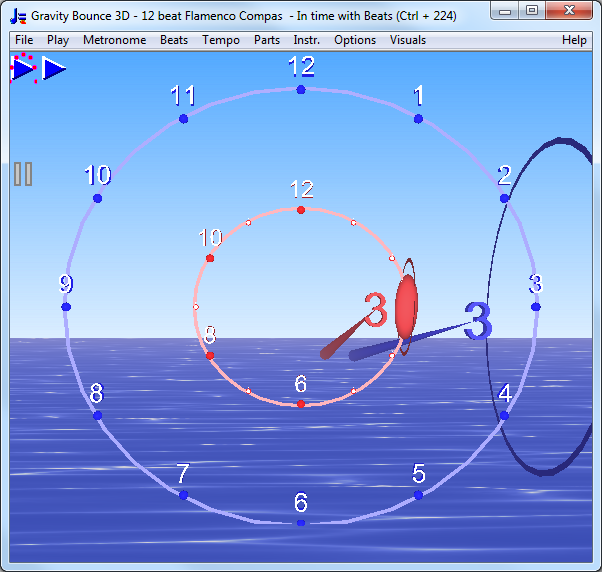
This is one of the rhythms of the Drum & Dance Metronome. This is what it looks like full screen with the 3D Bounce:
To show this after you download the metronome, then you go to
In the screen shot the tempo dial is hidden which you can do in - choose Image from the drop list for instead of Tempo Dial & Image. Though the 12 beat Flamenco rhythms are all based on this clock they can start at different places in the clock, e.g. 12, 1, 8 or 11, and have extra accents. Bounce Metronome Pro can also play 3 and 4 beat Rhythms with accents wherever you like, so you can practice those Flamenco rhythms as well. You can find tutorials for these rhythms on youtube by Flamenco players - here is an example.
Other Flamenco metronome software for your Windows PCCompas Flamenco - by Magnus Wang See also his "An introduction to Flamenco rhythms" Flamenco Metronome - by Graf-Martinez FlamencoMetronome.co.uk FREE ON-LINE Flamenco Metronome FlamencoMetronome.com mp4 clips download (you can vary speed of the clips to vary tempo if you use a variable speed mp4 player). Other useful links:Overview of complex rhythmical structures including Flamenco For the Bounce Metronome Pro Flamenco Clock, go here:
Or download your 30 day Free Test Drive - including your free taster time signature metronome which is yours to keep whether you buy or not
More Videos:Watch Gravity Bounce |



|
|
|
♥ |
| Disclaimer |
| Products - Music - Bounce Metronome |  |
| free of spyware etc |  |