
|
|


|
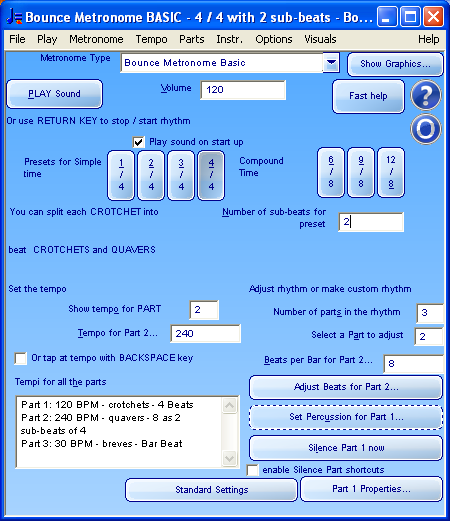
What it is like to useHere is a screen shot for any sighted readers of this page:
There are quick keyboard shortcuts for all of the controls in this window. At the top of the window you find a drop list of all the metronomes, here set to Bounce Metronome Basic. You can select other metronomes here. The Basic one is a good starting point as it has fewer controls to learn, and the same shortcuts are used for the other metronomes. Then there's a Play Sound button, volume control, then buttons for some of the common time signatures like 3/4, 4/4, 6/8 etc. After that there's a field to set the number of sub-beats of each beat. Then there are some fields to adjust the tempo, then you can adjust the number of parts in the rhythm - for instance 6/8 will have three parts, to play the eighth notes (quavers) the dotted quarter notes (dotted crotchets) and the bar beat. You can vary the number of beats in each part, and silence or play any of the parts or set the instrument to play each part. Then there are buttons to bring up other windows you can use to adjust timing and volumes of individual beats, and adjust the part properties (e.g. the stereo pan location of each instrument). Download your Free Test Drive of Bounce Metronome Pro Now! What it sounds likeHere is what it sounds like with the standard settings, playing 3/4: Bounce Metronome Basic 3/4. Download your Free Test Drive of Bounce Metronome Pro Now! Return key to stop and start the metronomeYou start and stop the metronome using the Play Sound button. You can also use the RETURN key to start and stop the metronome. This works wherever you are in Bounce Metronome. Also the keyboard focus stays with the control you are using so that you can start and stop the metronome at any time without need to navigate to the play button or back again. Download your Free Test Drive of Bounce Metronome Pro Now! Overview of the main shortcutsIt's Alt + V to set the volume and Alt + T for the tempo. You can also set the tempo by tapping at the desired tempo with the backspace key. You can use any of the preset time signatures with shortcuts such as Alt + 3 for 3/4, Alt + 4 for 4/4, and Alt + 6 for 6/8. You can play sub-beats of every beat using Number of sub-beats for preset (Alt + N). Download your Free Test Drive of Bounce Metronome Pro Now! Page up and Page down keys to adjust numbersYou can use the Page up and Page down keys to increase or decrease the number of sub-beats. The same method works with other numbers in Bounce Metronome in single line text fields. Since these shortcuts are easy to use, the spin controls to adjust numbers are all hidden in the No Graphics version of the program. Download your Free Test Drive of Bounce Metronome Pro Now! Fast HelpFor a reminder of the main keyboard shortcuts and other help to get started, use the Fast Help button in the main window. Download your Free Test Drive of Bounce Metronome Pro Now! Adjusting the rhythmThe rhythm is made up of several parts each played on a different instrument. To read the details of all the parts in the rhythm go to the "Tempi for all the parts" field, shortcut Alt + H. To choose which part to show the tempo for go to Show tempo for Part (Alt + O). So for instance if the rhythm is in 4/4 with two sub-beats, you will see three parts, for the bar beat, the four beats to a bar, and the eight beats to a bar to play the sub-beats. So for instance if you want to set the tempo for the four beats to a bar, choose the part which plays 4 beats (normally part 1). You can skip individual beats, set the times for the beats, and set the volumes for the beats using the Adjust individual Beats as Numbers (Ctrl + 77) window. Download your Free Test Drive of Bounce Metronome Pro Now! The other metronomesThis description is for the basic metronome. All the other metronomes work in the same way with the same main window shortcuts. Of course they also have additional shortcuts for each one as needed. If you want to read more about them before you download, look at the pages for the individual metronomes in this web site. These pages are designed for sighted users so don't go into details of the keyboard shortcuts, but will give a good idea of what the metronomes can do. You'll find audio clips for each metronome and an introduction to their capabilities. To find these pages see the Metronomes contents table To try them out download Bounce Metronome, and select the metronome of interest in the drop list of metronome types. The tool tip help will help you to find out how to use the metronome. Download your Free Test Drive of Bounce Metronome Pro Now! Built in tool tip helpThis is just an overview. As you use the program you will find out more about how to use it by calling up the built in tips and help. It's F1 to show the help for a window, and Shift + F1 to show the help for a particular control within the window.
Or download your 30 day Free Test Drive - including your free taster time signature metronome which is yours to keep whether you buy or not
More Videos:Watch Gravity Bounce |


|
|
|
♥ |
| Disclaimer |
| Products - Music - Bounce Metronome |  |
| free of spyware etc |  |