
|
|


|
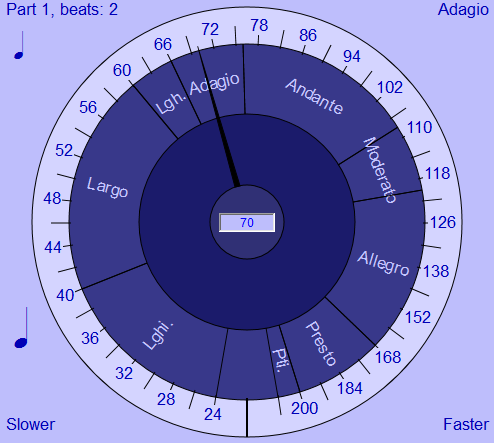
This screen shot shows the tempo dial for Bounce Metronome Pro. Download your Free Test Drive of Bounce Metronome Pro Now! Or to find out more about tempo markings, read on. How to decide what tempo to useThe tempo may be marked on the score as Quarter note = 92 (say) (or as crotchet = 92 in the UK). That means that the tempo for the quarter notes is 92 beats per minute. So set the dial to that tempo and then play so that your quarter notes are in time with the metronome ticks. For more on this see how to stay in time. You can set the tempo to any number in bpm, even to fractional beats per minute e.g. 60.5 or whatever.
Tap at TempoAlso, you can tap at the desired tempo with the BACKSPACE key - this works almost anywhere in Bounce Metronome Pro and is very handy if you want to vary the tempo while practicing on a musical instrument.
Typical tempo ranges for a modern metronomeThe tempo ranges shown on the dial are typical of modern metronomes. The tempo ranges used were: Over 200 Prestissimo 168 to 200 Presto So for instance, on a typical metronome, 100 bpm is moderato, 150 bpm is Allegro and 200 bpm is Presto. To get an idea of typical values for tempo markings, see the wikipedia article on Tempo However they are just indications, and it's well to not be too tied down to these numbers - except in pieces where the composer actually indicates in the score that you must follow a particular number of beats per minute.
Tempo names are often more to do with the feel of the musicThis is another page with a list of many examples of tempo indications in BPM for the different tempo markings. It gives an idea of how variable they can be - Dolmetsch Music Theory on-line - Tempo - Table of Tempo Markings. Indeed, the tempo names are often more to do with the feel of the music than anything you can measure exactly in beats per minute. So it wouldn't be wrong to play these tempi outside the range given on the metronome, e.g. an Andante below 76, or above 108. Andante in particular has an association with walking, sometimes translated as "at a walking pace", though if you look at the article, there is more to it than that, anyway the range of tempi for Andante is roughly the same as normal walking tempi, from well over one beat a second to well under two beats a second (beyond that it is more like running). Here is the interesting article by Charles Rosen on Andante which is quoted in that dolmetsch article: Charles Rosen on Andante In modern music if an exact tempo in beats per minute is required, then normally the desired BPM figure will be written in the score, maybe in addition to a tempo name for a guide to the "feel" of the piece.
Your free test driveThis tempo dial is part of Bounce Metronome Pro It is easy to set the tempo for the metronome with this handy dial. You get a free 30 day Test drive - with all the features fully unlocked. To get the program go here :
To find out about it's other features see Details and Features. If you have already downloaded it and wish to purchase, see Purchase. Note that there is a Money Back Guarantee if you purchase it and then find it isn't suitable for your needs.
Or download your 30 day Free Test Drive - including your free taster time signature metronome which is yours to keep whether you buy or not
More Videos:Watch Gravity Bounce |



|
|
|
♥ |
| Disclaimer |
| Products - Music - Bounce Metronome |  |
| free of spyware etc |  |