
|
|


|
Buy Desktop MetronomeUse your PC, Laptop or Netbook as a software metronome. You will find it easy to learn to play exactly in time with the rhythm when you use this metronome with its conductor's baton and drum sticks with the new Gravity Bounce feature. It is for Windows. Find out what it can do for you with your own 30 day free Test drive. As reviewed in the highly respected Sound On Sound Magazine (available in every major newsagent). You will love this easy to use and powerful software - check out the user testimonials to find out what others have made of it.
9 user testimonials - or move mouse over scrolling reviews to pause
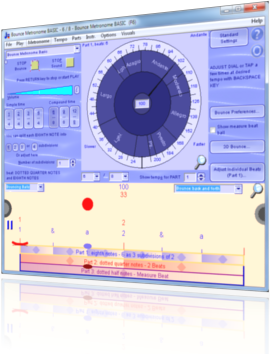
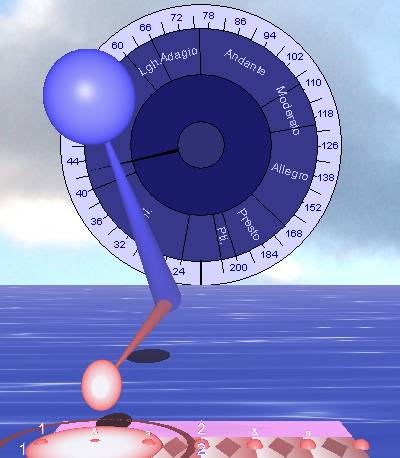
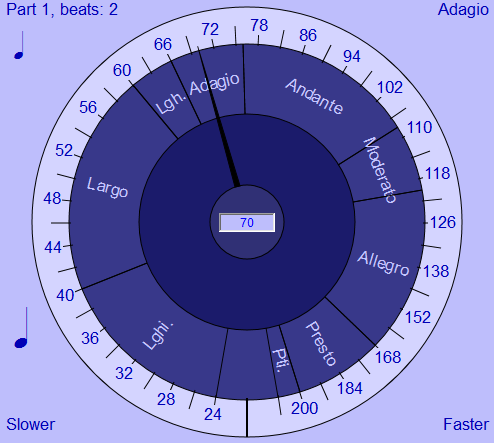
ScreenshotsHere are a few screen shots of the 3D metronome and the dial.
The sea is animated when you play it - that's an extra touch which makes it pleasant and relaxing to use the metronome. I have taken care over the design so that your many hours of metronome practice can be a pleasant experience. In fact, you can use any animation you like for the sea or for the sky, even as an animated texture for the bouncing balls or baton. You can even watch a movie in the background with subtitles while you practice with the metronome - if that is your thing :-). The splash effect helps you to see the moment of the beat clearly.
You can use the numbers to the right to set the time signature and number of subdivisions. You can also use the triangle controls to adjust the beats per measure by hand to make polyrhythms - so in this way can do many tasks entirely within the 3D window.
You click on the dial to set the tempo. You can also tap at the desired tempo with the backspace key (chosen because it is large so easy to use when practicing). Keyboard shortcuts - use the left and right arrow keys to increase tempo by 1 BPM at a time or up or down arrow keys to vary by one notch at a time. This works throughout Bounce Metronome Pro. You can use the Return key to stop or start the metronome - again this is a large key on the keyboard so easy to use while practicing, when it could be fiddly to click on an on-screen button with the mouse. Gradual changes of tempoYou can also set the dial to vary the tempo gradually over a number of seconds or minutes - either to practice a piece at faster and faster (or slower and slower) tempi - or to practice the difficult art of smooth slow and gradual tempo changes. As you play you will see the pointer on the dial gradually move up or down as the tempo changes automatically to play faster or slower as desired. Automated conducting of all the rhythms for an entire pieceFor more advanced users, you can also make a script with all the tempo and time signature changes for an entire musical piece. It can change rhythm automatically at all the right bar numbers for the music - and with support for repeats, and flow directions (like Da Capo Al Coda etc). Don't worry - this isn't that technical, the script is simple and easy to understand. Then you can just click the play button and watch it conduct all the rhythms for the piece. FREE BONUSYour unlock key also unlocks the "fractal" tunes for Tune Smithy - make fractal music intricate as snowflakes - your very own royalty free music. To read about this feature or to try out the fractal tunes to see what you get, visit: Play and Create Tunes as Intricate as Snowflakes.
It has many other features FREE BONUS, you get the Tune Smithy fractal tunes - play and create beautiful fractal music as intricate as snowflakes, your own royalty free fractal music. It has separate metronomes easily selected from a drop list adapted to the special needs of various types of user. This makes it an ideal tool for Polyrhythms, Swing, Drum or Dance rhythms, Additive rhythms or rhythm cycles, for a feature rich Pro metronome, or for a basic time signature metronome - amongst the many possibilities. You will probably find a specialist metronome there already adapted to your own particular needs. If not, contact the developer and I'll add it to the wish list for the future. To find out more about the metronome see What is special about this metronome software. For other ways to buy it and FAQ - see Buy metronome. To download your free test drive go to the Download page.
Other versions of this page (for search engine and ads optimisation): Buy Metronome Software - Buy Windows Metronome Now - Buy Desktop Metronome Now - Buy Swing Metronome Now - Metronome for Sale - Sale - Buy Windows Metronome for PC - Buy Drum Metronome. These only differ in the title. It's so that visitors from search pages and ads see a page with the same title as the ad or the search keyword.
Or download your 30 day Free Test Drive - including your free taster time signature metronome which is yours to keep whether you buy or not
More Videos:Watch Gravity Bounce |






|
|
|
♥ |
| Disclaimer |
| Products - Music - Bounce Metronome |  |
| free of spyware etc |  |