
|
|


|
You can do so much more with this metronome
|

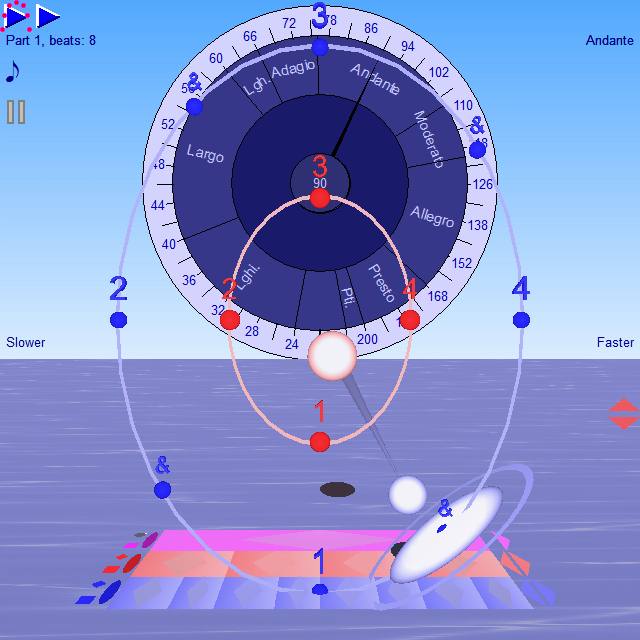 |
It is easy and natural to anticipate the movement of a bouncing ball, baton or drumstick. So the visuals show the rhythm with precision - for more about this see Gravity Bounce Conductor. So you can also use it as a silent metronome - like watching a conductor - useful when your instrument is too loud to hear the clicks. Anyway probably it works because it is continuous, and doesn't just change in sudden jumps. So you see your place in the measure and in each beat at any moment. Also, the natural bounce motion helps you to feel the timing of each beat before it happens. This helps you to feel the rhythm and to anticipate the beat like a professional - and is extremely useful for practice of rhythms with irregular beat timings such as swing, or tricky rhythms like polyrhythms. You can set it to show beat numbers for the beats and subdivisions to help you keep track of where you are in the measure. |
A useful exercise to help you feel the timing of rhythms more precisely.
One exercise which helps you to feel the rhythm more precisely is to play to try to merge your notes with the metronome clicks. This is something that the gravity bounce visuals will help you to achieve more easily. When you can do this, then you can play more exactly in time with other musicians too.
To start this exercise, first, you try playing consistently ahead of every beat first. Then behind the beat. Then get as close to the beat as you can from either side without hitting it. Then finally see if you can merge your notes with the beat so precisely that you and the metronome sound as one note. The sound of the metronome can seem to vanish on louder instruments like drums so it seems to miss a beat or two. On quieter instruments it will seem to get quieter or may seem to "become one with your note".
When you achieve this merge, this shows that you are exactly in time - but is hard to keep up for long because if you can no longer hear the metronome - how do you keep in time with it?
So - the bounce movement helps with this too. You can see your position in the beat clearly which helps when you want to play ahead or behind the beat. Then when you merge - then it doesn't matter that the sound of the metronome vanishes as you can still see your position in the beat. So - try this exercise and see if you can merge your notes with the clicks in this way - and how long can you keep it up for when you do?
For more on this topic see How to Stay in Time - Try to play so that your notes merge with the metronome tick
If you want to find out more about the gravity bounce, skip to gravity bounce
Bounce Metronome Pro has many more professional features
“Have you ever found it difficult to play along with a standard click track? Bounce Metronome Pro is a PC application supporting all time signatures, swing, and lots of clever stuff like paradiddles, polyrhythms and gradual tempo changes....”
Printed review in Sound On Sound Magazine, January 2010
For details of some of this "clever stuff", including the Play then Silent and Gradually Changing Tempo, skip forward to See what you can do - or 25 Special Features.
Or continue for screen shots and videos.

Not a Karaoke Machine - sorry
skip to screen shots - skip back
Although the bounce effect is "rather like" a karaoke machine, it takes a slightly different slant on things, and can't be used like that - at least not yet. So, if you want a karaoke machine you need to look elsewhere.
- You can use this software to help members of a band to play in time with each other
- You can use it to help synchronise singers with a live band - both singers and the live band need to follow the rhythm of the bouncing balls or lyrics - and then they will be in time with each other.
- But you can't yet use it to help you to synchronise your singing or playing with pre-recorded tracks of any sort. Not yet.
With a live band - it's probably most useful for occasional use during practice rather than for performance, as for any other metronome, as a way to learn to internalise a steady rhythm and tempo, and to notice when your tempo or rhythm is uneven - also to help with playing gradual tempo changes smoothly.
If used during performance, it has the same advantages and disadvantages as a click track, or live performance to a metronome - so can be used in similar situations and requires care in its use.
For proper use as a karaoke machine, then more work is needed on the software, and it can't yet do this.
If you want a karaoke machine, or software to add bouncing visuals to enhance your music tracks, you may like KaraFun - a free software tool that does this and I gather it is rather popular gets good reviews (no connection with me). See Karafun.
For details about the possibilities for BM Pro for karaoke etc. for the future, see the wishes: To play an audio recording and synchronise with the bounce - and to get the rhythm and lyrics from a midi file.
Screen Shots
skip to videos - skip back
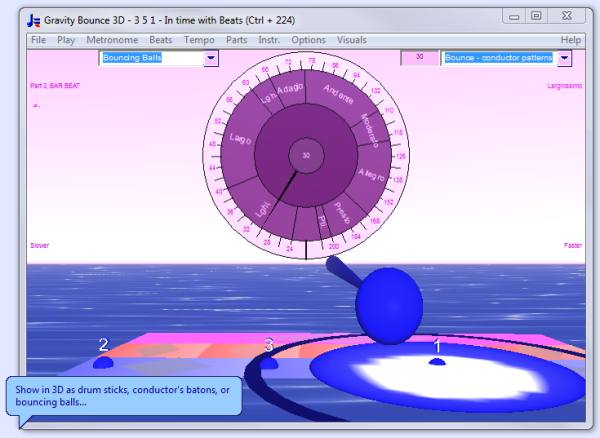
Larger version of this screen shot
Videos
skip to see what you can do - skip back
You can use the icon at bottom right of the video to view it full screen. It's the icon with arrows pointing outwards to the four corners.
This is the Flamenco Metronome with the 12 beat "clock" to help you keep your place in the complex rhythms. |
YOU CAN TRY IT OUT FIRST with your 30 day free This shows a four beat rhythm with swing, from the Swing metronome. |
Do you find that the visuals in this clip hesitate now and again and get out of sync with the sound? If so, don't worry, you can still use the metronome just fine. The software you download is carefully designed for your computer to play its visuals precisely in time with the rhythm.
This is a simple two beat conducting pattern suitable for rhythms such as 2/4 or fast 6/8. |
This shows 5, 3 and 7 beats per measure played simultaneously, each with 2 subdivisions. More Polyrhythm videos
From the Polyrhythm metronome.
For more videos see Watch Animations.
"Clever Stuff" - See what you can do :-)
skip to 25 special features - skip back (to Videos)
Bounce Metronome Pro is a PC application supporting all time signatures, swing, and lots of clever stuff like paradiddles, polyrhythms and gradual tempo changes....”
Printed review in Sound On Sound Magazine, January 2010
So what about this "clever stuff"?
BASIC METRONOME
With just the Basic metronome you can play all time signatures including odd time signatures, with subdivisions, accents and syncopation and at any tempo. You can accent or skip any note in the rhythm with a single click - this helps with syncopated rhythms for instance. You can set the instrument individually for every beat in the rhythm.
The Basic metronome, despite the name, is already a very advanced metronome by any standards.
TEMPO DIAL FOR THE BASIC METRONOME
The Tempo dial comes with many features that make it fast to use, and to help with your metronome practice including Tap at tempo with the BACKSPACE key, and use of the ARROW keys to quickly adjust the tempo by one BPM or one tempo dial notch at a time, or step through a list of tempi with the UP and DOWN arrow keys.
You can use fractional BPM and the range in BPM is unlmited - if you want to set it to play one beat every thirty seconds, or 1000 beats per minute, or whatever, no problem.
PRO METRONOMES
With the pro version of the software, you get specialist metronomes for many different ways of practicing.
You can practice swing rhythms (for Jazz, Scottish dance etc). You can practice drum and dance patterns with a mixture of note sizes such as paradiddles - up to 16 parts each with its own rhythm, instrument, stereo pan position etc - or polyrhythms, mixed meters, also rhythms you tap out yourself. Need more information about this? See All the Metronomes.
PLAY THEN SILENT
You can set the pro metronomes to go silent for a number of measures. So - you might set it to play for 2 measures, then go silent for 2 measures and repeat. This is useful as an exercise to see if you are still in time with the metronome when it continues after the silence. This helps you to improve your ability to keep a steady tempo beat independently of the metronome - if you want to.
GRADUALLY CHANGING TEMPO
The Pro metronomes also include a gradually CHANGING tempo feature. This can be used to play the same section gradually faster and faster, or slower and slower - or to practice smooth tempo changes.
ANY RHYTHM YOU ARE LIKELY TO ENCOUNTER, BOUNCE METRONOME PRO CAN HANDLE IT
In short it can help you to play all the rhythms you are ever likely to need for your metronome practice and with all the tempo options you are ever likely to need.
Any rhythm you are likely to encounter, well Bounce Metronome Pro can almost certainly handle it.
You can also switch off the metronome ticks, and use it as a silent metronome. When you do that, it makes practice with the metronome a more organic and gentle process, and helps keep the practice vibrant and your rhythms more fluid and free as your timing and tempo improves.
TO FIND OUT MORE
If you think of any feature a metronome should have and you don't find it - do let me know. I continue to improve the design and add new features in response to many user questions and suggestions. To see a list of some of the things I've added recently, visit the What's new page.
To find out more about its capabilities - skip to 25 Special Features. Or if interested in a particular feature - click on any of the links in the description above.
Click here to Buy Now for only $6.99, or $26.99 with the Pro Features!
Or if it is new to you, you may want to try out a test drive first:
25 Special Features
skip to tempo dial - skip back
- Gravity Bounce Conductor, drum sticks and bouncing ball to mark the start of each beat crisply and in time with the sound.
- Play without the sound as a silent metronome.
- Conducting patterns, bounce inside ovals, and other bounce patterns to help you play with precision
- Set any Tempo with the handy dial with any tempo including fractions of a BPM.
- Large easy to press tempo shortcut keys - Tap at tempo with Backspace key, Return key to stop and start play
- Set the tempo to change gradually over a time period in seconds or minutes
- Arrow keys to adjust tempo, or step through a list of all the tempi and rhythms for a practice session.
- Set up a script with all the rhythms and tempo changes for a complex piece of music - then just click the play button to play them all one after another - e.g. as conducting patterns.
- If you just want a steady tick you can do that
- Any time signatures - that includes odd time signatures
- Beat subdivisions for any of the time signatures
- Play the bar beats, beats and subdivisions with different instrument sounds
- Practice Swing Rhythms with any amount of swing.
- Accent any beat with just one click (with any number of levels of accent).
- Syncopation - using accents it is much easier to practice syncopated rhythms
- Skip any beat with just one click
- Quckly adjust individual beat volumes
- Quickly adjust individual beat times
- Drum and dance rhythms - set the metronome to play any rhythm with any combination of quarter notes, eighth notes, sixteenth notes etc one after another
- Polyrhythms (cross rhythms) e.g. play 3 beats and 4 beats in the same measure at the same time.
- Mixed meters (additive rhythms) and rhythm cycles
- Harmonic metronomes - pitched metronome using notes from the harmonic series so that they sound good together.
- fractal tunes - try out any rhythm with an automatically generated melody
- You can explore Theremin's Rhythmicon too, probably the first "drum machine", it played polyrhythmic chords using pitches from the harmonic series.
- Song Car Tunes ball bouncing on lyrics - set words to your rhythms
FREE BONUS, you get the Tune Smithy fractal tunes - play and create beautiful fractal music as intricate as snowflakes, your own royalty free fractal music.
It has separate metronomes easily selected from a drop list adapted to the special needs of various types of user. This makes it an ideal tool for Polyrhythms, Swing, Drum or Dance rhythms, Additive rhythms or rhythm cycles, for a feature rich Pro metronome, or for a basic time signature metronome - amongst the many possibilities.
This is just a selection. You will find many more features
The easiest way to find out what it can do is to download your free test drive. Try it out for yourself to see what it can (and can't) do.
What this software can't do yet
Features which it doesn't have yet, but may be possible in the future include:
- Synchronisation with a pre-recorded track - mp3 or midi - this is quite hard to program so you may not get this feature for a while
- Use n-tuplets and grace notes in the drum pattern rhythm editor
- Play tunes in abc notation
- Play conducting patterns recorded by human conductors or extracted from a video
Also check out the Bounce Metronome Pro Wish List for more things you can't do yet but may be able to in the future.
If still unsure whether it can do what you want, just contact me, and I'll let you know whether it can do what you want - or add your wish to the wish list if not.
Tempo Dial - what is special about this dial?
skip to silent metronome - skip back
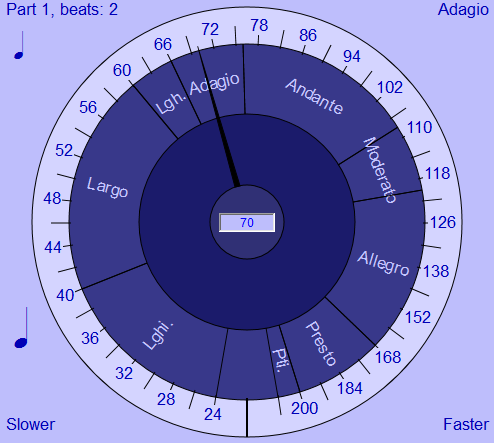
This is a screen shot. You need to download your free 30 day test drive of the metronome to try it out.
This dial probably looks ordinary enough at first sight, but its simplicity hides a number of secrets which will help with your practice in many ways.
You have unlimited tempo and fractional BPM (if outside the range of the dial, just type the desired tempo into the tempo field).
Quick adjust by one notch or BPM as you practice with a tap on the arrow keys on your keyboard. Tap at tempo feature - you just tap a few times with the Backspace key to set the dial to the tempo of your taps.
Then you can set it to a SMOOTHLY CHANGING tempo e.g. the same rhythm gradually faster and faster or gradually slower and slower, to learn to play at slow or fast tempi - or to practice professional smooth and gradual tempo changes.
Or - a useful feature for a practice session - step through the tempi - and rhythms too - of all your pieces with a single tap on the UP and DOWN arrow keys.
To find out more see the page on the Tempo Dial features.
Now You Can Have a Silent Metronome - with No Annoying Metronome Click
skip to gravity bounce conductor - skip back
The conducting visuals are so crisp, they indicate the time with the precision of a conductor's baton. So, you can switch the sound off and use it as a silent metronome. It has the same precision as one with sound. (see Gravity Bounce).
“I found it reliable enough to abandon audio clicks altogether and use as a silent metronome, which also makes it useful for deaf musicians. Studio owners could display it on screen in their live rooms to keep players in time without them requiring headphones, while a special screen reader is available to blind musicians too” Martin Walker, PC Notes column in Sound On Sound Magazine
What's more there is something about the motion of the gravity bounce which is uplifting, and makes it feel more organic and enjoyable to work with.
For more about this see Silent Visual Metronome.
Gravity Bounce Conductor - What makes it so easy to play in time with this metronome?
skip to swing and lilt - skip back
The innovative gravity bounce conductor helps you to play exactly on the beat. This is especially useful when you are learning a rhythm with swing, syncopation, or irregular beat patterns.
So, how does it work, and why is it so successful?
It is easy and natural to anticipate the moment when a bouncing ball will hit the ground - so that you can sing, play or clap exactly in time with it.
This technique was used in the "Car tunes" movies towards the end of the silent movies era and for the first movies with sound. The ball bouncing on the lyrics helped the audience to sing along with the movie.
Conductor's use the same technique, a bouncing motion of the baton which helps to indicate the moment of the beat clearly and crisply.
So - the motion of a bouncing ball is one we happen to be able to synchronise with very easily (c.f. sports like tennis and football). So when you incorporate that into a metronome the result is natural feeling and easy to work with.
For more about this, see Gravity Bounce Conductor.
What are Swing and lilt, and how does it help to have a metronome with these features?
skip to harmonic features - skip back
You find swung notes in many types of music, not just Jazz. Notes are played alternately longer and shorter than usual though normally notated all the same length. It is what gives music its lively quality. It is what makes you want to swing or dance to the music.
Even when the music doesn't belong to any of the genres associated with swing, it will still have a gentle "lilt". That's a slight unevenness in the timing of the beats which just lifts the music and makes it feel more natural and organice. All performers do this - often without knowing it as it can be quite a subtle effect.
If you practice the same piece with many different levels of swing or lilt, it may help you learn to vary the amount of swing, and play swing and lilt in a more flexible fashion.
It also may well make it easier to play along with the metronome if you set it to a gentle lilt - or a swing - depending on the music genre.
You can make swung rhythms with a light, medium or hard swing, or any custom amount of swing with Bounce Metronome Pro.
Bounce Metronome Pro is ideally suited for this too. It's gravity bounce visuals help you to anticipate each note before you need to play it - and this makes it much easier to practice with exactly the same amount of swing or lilt as the metronome, and so use the metronome to help learn to vary the amount of your swing.
For more about this, see Swing and Lilt Metronome
Harmonic features - an idea from music therapy
skip to auto generated tunes - skip back
Here the idea is that each number of beats per measure is assigned a pitch, so e.g. 7 beats to the bar corresponds to the seventh harmonic, 5 beats to the bar corresponds to the fifth and so on.
The results sound harmoniously together as they use pitches from the harmonic series. See Harmonic Features for more about this.
Play your rhythms with a new tune each time
skip to for blind - skip back
This is a way to create automatically generated tunes to brighten up your music session, or as a way to hear your rhythm played melodically. Perhaps most useful if you practice a non melodic instrument like drums - or just for fun.
It can also be used for algo-comp type composition but for that you are best using Tune Smithy rather than Bounce Metronome Pro as it is all set up for this sort of work.
The automatically generated tunes use fractals - similar idea to the visual fractals such as the mandelbrot set etc. Though in this case it is based on a musical equivalent of the Koch snowflake fractal.
To find out more see Melodic Features.
Special note about the BM Pro tunes for FTS users
Bounce Metronome Pro does have some new features such as the skipped beats and other rhythmic features which aren't yet in FTS, so it's possible some keen algo-comp users of FTS might want to use BM Pro to exploit these features. But your tunes made with BM Pro won't yet play in FTS until I do the update to FTS 4.1 hopefully later this year.
Accessibility for blind musicians
skip to for deaf - skip back
For blind users and those who don't work visually very much perhaps because you are visually impaired, there is an alternative interface designed for you.
With this text based interface, you can play all the same rhythms as a sighted user. You can use all the features - except for the bouncing ball visuals of course - and an option to get beats from a groove via clicks on the visual display of the waveform. Everything else is accessible through your screen reader.
For more about this, see the Blind Musician's Metronome page.
Download your Free Test Drive Now!
Accessibility for deaf musicians
skip to feature comparision - skip back
Since it can be used entirely visually, as a silent metronome, it is an ideal metronome for a deaf musician. There is no need to be able to hear the sound to play in time with the metronome.
See Deaf Musician's Metronome.
Feature Comparison Chart
skip to links - skip back
For a list of all the features available in Bounce Metronome Basic and in Bounce Metronome Pro and a feature comparison chart, see Details and Features.
Links
skip back
For more about the bouncing balls in early movies, see Sound Car-tunes and Bouncing Ball. For swung rhythms, see Swung note (wikipedia)
Here is a useful Short History of the Metronome
To find other relevant material, try some of the top google searches related to this web site -see keywords.
Some top keyword searches particularly relevant to this page: rhythm, metronome, rhythms, metronomes, metronome download, metronome software, and metronome, tempo metronome, downloadable metronome (click on the link to search in Google).
For some of the other metronome software available, see the Metronomes section at HitSquad. For a collection of free on-line metronomes see the BestMetronome.com
I recently came across another software metronome with a bouncing ball display with the ball bouncing under simulated gravity, (there are many that have lights or a ball that move up and down at constant speed, but this is the only other one I know with a gravity bounce). See the Professional Metronome by Storm Software.
I've also found a metronome for mobile phones with conducting visuals, called Metronome 3D. For videos, search Youtube for "Metronome 3D".
Here is a long list of some of the other on-line and Windows desktop metronomes. with some of the main features - free or shareware.
- (shorter versions of this page: Buy Metronome for Windows, Buy this metronome software here)
Keyword Ad landing pages
Many of these are very similar to each other - just so that the title and the exact text on the page can match the text on the keyword ad. If you click on one of the ads in e.g. the Google search results you will probably end up on one of these pages.
Bounce Metronome Pro for Sale - (Metronome for Sale 2) - (for Sale 3) - Buy Bounce Metronome Pro - Buy or Download - Download Metronome (Download Metronome 2) (Download Metronome 3 ) - Metronome for Windows - Metronome Free Test Drive - Time Signature PC Metronome (Time Signature Metronome 2) (Time Signature Metronome 3 ) - Metronome Free Test Drive
Ready to Buy |
Save time and buy it right away Your Money Back Guarantee
|
Or download your 30 day Free Test Drive - including your free taster time signature metronome which is yours to keep whether you buy or not
More Videos:
Watch Gravity Bounce
New Videos
Time Signatures and Other Rhythms
Polyrhythms
Rhythms with no exact number of beats
Polyrhythm 3/4 over 4/4
4/3 over 4/4 type Polyrhythms-
Polyrhythmic paradiddles etc
Swing Rhythms
Conducting Patterns
|
|
|
♥ |
| Disclaimer |
| Products - Music - Bounce Metronome |  |
| free of spyware etc |  |